
Every check your site needs,
in one platform.
Scan your website, your code and the pages you have open in Chrome. Every tool explains what it found and writes the fix for your stack.
Free to start. No credit card required.
Paste a URL
Scan any website
Nothing to install. Enter a URL and get scored results with fixes in about a minute.
Website Audit
Performance, SEO & accessibility
- Core Web Vitals and load speed
- On-page SEO and meta tags
- WCAG accessibility issues
SEO Optimizer
GEO readiness, E-E-A-T & Search Console
- GEO and AI-search readiness
- E-E-A-T trust signals
- Google Search Console data
Security Scan
Headers, vulnerabilities & HTTPS
- Security headers and CSP
- HTTPS, TLS and mixed content
- Vulnerability signals and exposed secrets
Browser Audit
Real browser rendering & console errors
- Console and JavaScript errors
- Core Web Vitals in a real browser
- Mobile compatibility pass
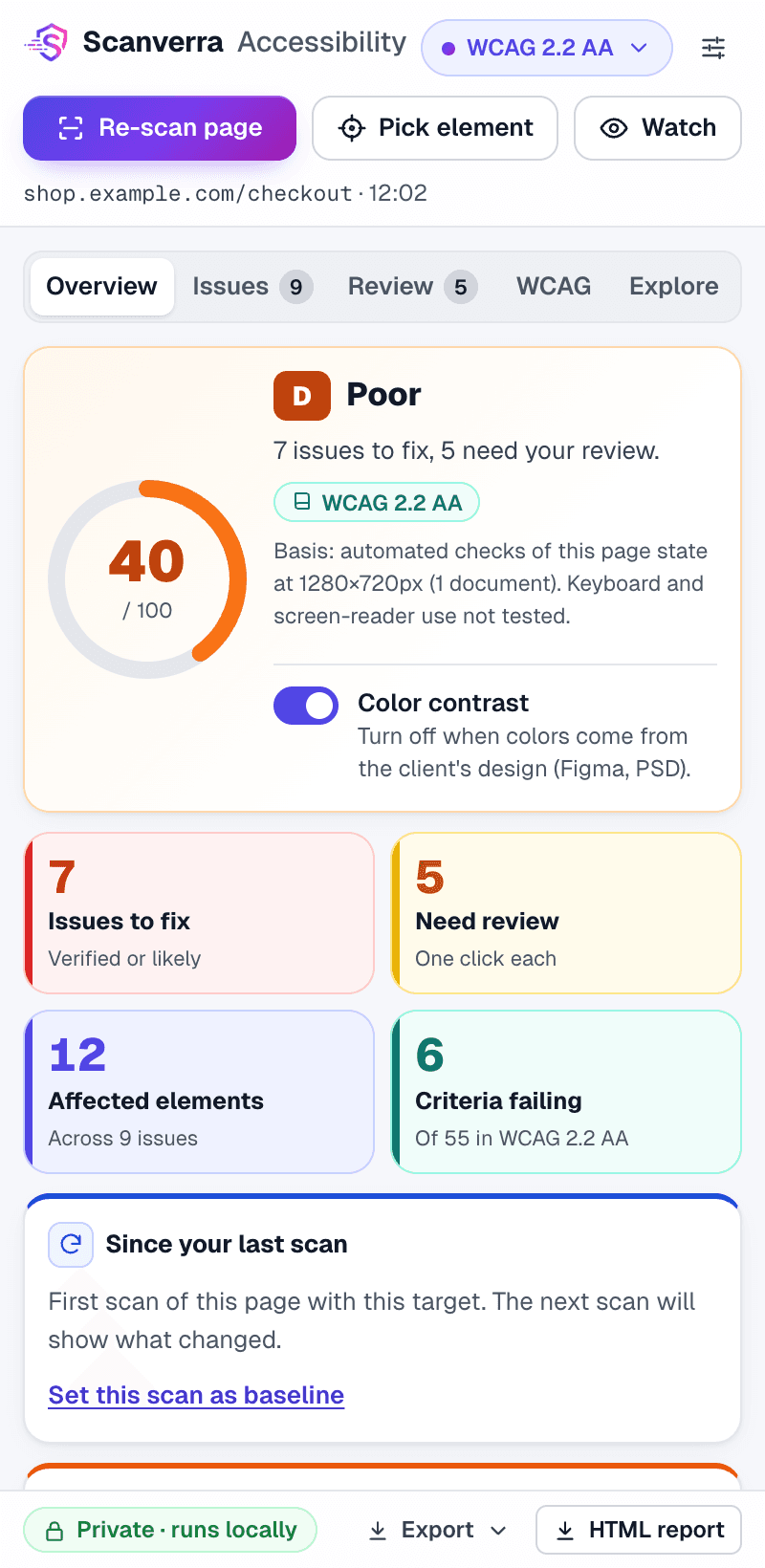
Accessibility checks inside Chrome
Scan any page you have open, from a panel right on the page. Issues are grouped by component, each with the evidence behind it and fix code you can paste.
- WCAG 2.2 checks on any open page
- Fix code for HTML, React, Vue, Angular and Svelte
- Runs in your browser, uploads only reports you save
Connect your code
Scan your code
Connect a GitHub or Bitbucket repo, or run the same checks from your terminal, CI pipeline and editor.
Repo Scanner
Secrets, CVEs & AI-agent risks
- Hardcoded secrets and SAST issues
- Dependency CVEs and outdated packages
- AI-written fixes with one-click PRs
CLI
Scan code locally, any git host
- Runs on your machine, any git host
- Fails CI builds on real problems
- Only findings are uploaded
VS Code extension
Findings inline while you code
- Findings on the exact line
- Secrets, CVEs and IaC issues
- Catch problems before you commit
Not sure where to start?
Which tool do I need?
Start from the problem you want to solve.
- Speed up slow pages and pass Core Web VitalsWebsite Audit
- Rank in Google and get cited in AI answersSEO Optimizer
- Harden security headers and HTTPSSecurity Scan
- Catch the JavaScript errors visitors actually hitBrowser Audit
- Find and fix accessibility issues on any pageAccessibility Extension
- Find leaked secrets and vulnerable dependenciesRepo Scanner
- Scan code from your terminal or CI pipelineCLI
- See security issues while you write codeVS Code extension
What each tool checks
Scanverra is an AI-powered audit platform for websites and the code behind them. Four website scanners cover performance and SEO, security, real-browser behaviour and GEO/AI-search readiness. Repo Scanner, the CLI and the VS Code extension check your code for secrets, vulnerable dependencies and misconfigurations, and the Chrome extension finds accessibility issues on any page you have open. Every tool shares the same dashboard and AI-written fixes, from a single landing page to automated scans in CI/CD.
Website Audit
Scanverra's Website Audit checks Core Web Vitals (LCP, CLS, TTFB), on-page SEO signals like meta descriptions and canonical URLs, and WCAG accessibility issues in one pass: a full performance, SEO, and accessibility audit without juggling three separate tools.
SEO Optimizer
SEO Optimizer goes deeper than a single-page score: it checks GEO/AI-search readiness (answer blocks, FAQ schema opportunities), E-E-A-T trust signals (author identity, content freshness, entity consistency), image and hreflang coverage, and can optionally render JavaScript for SPA content. Connect Google Search Console to see real queries, clicks, indexing status, and mobile usability for the exact URL you scanned.
Security Scan
Security Scan inspects HTTP response headers, TLS/HTTPS configuration, mixed content, and common vulnerability patterns like missing CSRF tokens or exposed secrets. Use it as a lightweight security scanner for pre-launch checks or as a recurring vulnerability scan in production.
Browser Audit
Browser Audit loads your site in a real browser to catch console errors, broken JavaScript, and layout issues that static crawlers miss, with no test scripts to write or maintain.
Repo Scanner
Repo Scanner connects to GitHub or Bitbucket and runs a code-quality and dependency-health scan across your repository, flagging outdated dependencies, hardcoded secrets, and common code smells before they ship.
Accessibility Extension
The Accessibility Extension runs WCAG 2.2 checks on the page you have open in Chrome or Brave. Repeated problems are grouped by component with fix code for common issues in HTML, React, Vue, Angular and Svelte, anything automation can't confirm is sent to review instead of being reported as a failure, and scans run in your browser, so page content stays on your device unless you save a report.
Guides and comparisons
Checklists, step-by-step fixes and honest comparisons with other tools.
Frequently asked questions
Across its six tools, Scanverra checks website performance (Core Web Vitals, load time), SEO fundamentals (meta tags, canonical URLs, structured data), GEO/AI-search readiness and E-E-A-T trust signals, accessibility (WCAG issues on any URL, or inside Chrome with the Accessibility Extension), security (headers, HTTPS, vulnerabilities), real-browser rendering and repository code, all from one platform and one subscription.
No. Every tool runs from your browser: paste a URL for Website Audit, Security Scan, Browser Audit, or SEO Optimizer, or connect a GitHub/Bitbucket repo for Repo Scanner. Nothing to install locally.
Yes. Every tool has a REST API (see the API Documentation) so you can trigger an audit, security scan, browser audit, SEO scan, or repo scan directly from GitHub Actions, GitLab CI, or any pipeline, and gate a build on the results.
Yes. You can run audits for free with no credit card required; paid plans add unlimited scans, team seats, and scheduled monitoring: see Pricing for the full breakdown.
Website Audit focuses on performance, SEO, and accessibility; Security Scan focuses specifically on headers, HTTPS/TLS configuration, and vulnerability patterns. Many teams run both together for a complete pre-launch check.
Website Audit's SEO score is a quick on-page check (title, meta, headings) alongside performance and accessibility. SEO Optimizer is a dedicated, much deeper tool: GEO/AI-search readiness, E-E-A-T trust signals, keyword and competitor analysis, optional JavaScript rendering for SPAs, and a direct Google Search Console connection for real ranking data on the exact URL you scanned.
Repo Scanner connects to GitHub and Bitbucket repositories via OAuth, and can also run automatically through the API using a stored access token, no manual re-authorization needed for repeat scans.
Related reading
How to Fix Largest Contentful Paint (LCP)
Why your LCP is slow, how to find the element that's causing it, and the preload, image, and CDN fixes that actually move the number.
How to Fix Mixed Content Warnings
Why an HTTPS page loading even one resource over plain HTTP triggers browser warnings and breaks the padlock, and how to find and fix every instance.
How to Fix Outdated & Vulnerable Dependencies
Why a dependency with a known CVE sitting in package.json is one of the most common ways production apps get breached, and a practical process for triaging and updating safely.
Scanverra vs. Google PageSpeed Insights
Google's free Lighthouse-based performance report, with real-user CrUX field data alongside the lab score - no account, no pricing tiers.
Scanverra vs. Snyk
A developer-security platform scanning open-source dependencies, source code, containers, and IaC, priced per contributing developer with a capped free tier.
Scanverra vs. SonarQube (SonarSource)
A static code analysis platform for bugs, vulnerabilities, code smells, and technical debt across 30+ languages, free up to 50k lines of code.
Ready to run your first audit?
Paste a URL and get real results in under a minute, no credit card required.
Run free audit