
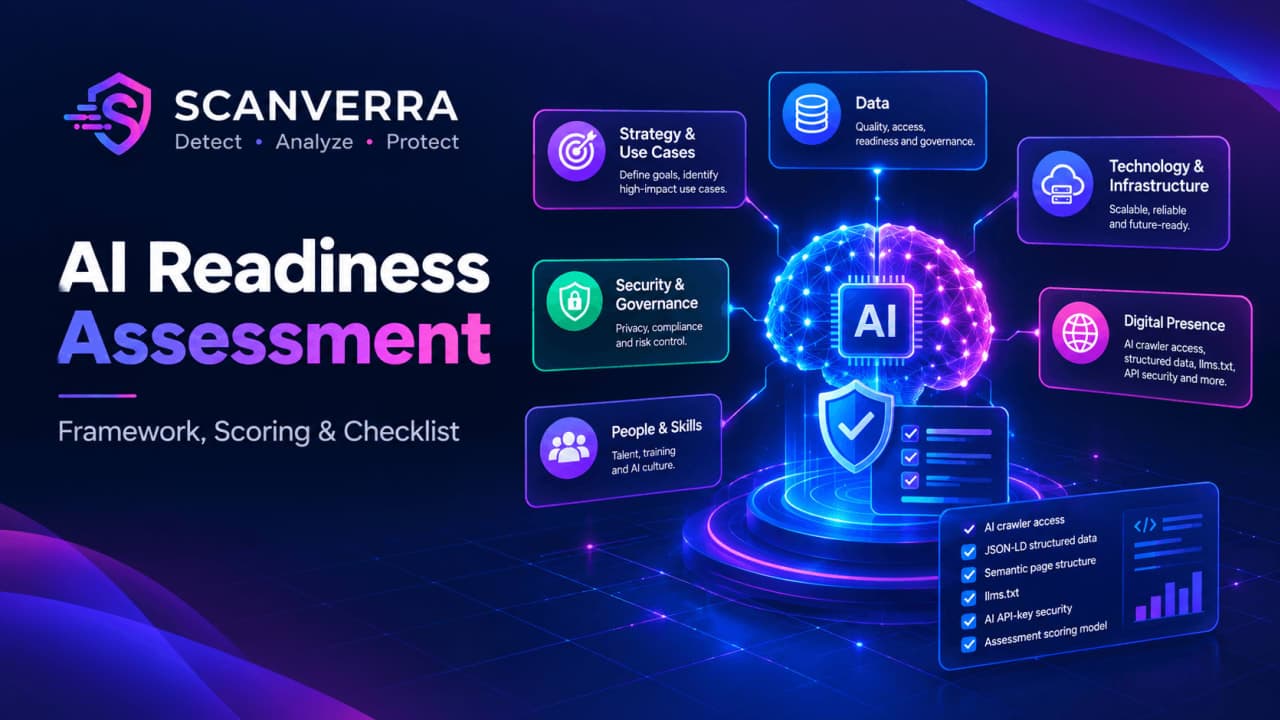
AI Readiness Assessment: A Practical Guide to Measuring AI Readiness
Most AI projects that stall do not fail because the model was wrong. They fail because the data was not ready, the security team found a leaked API key two weeks before launch, nobody owned the risk decisions, or the website the AI feature depended on could not be read by the assistants customers were already using. An AI readiness assessment is how you find those problems before they cost you a quarter.
This guide explains what AI readiness means, the six areas a useful AI readiness assessment should cover, a simple scoring model you can run in a week, and the two technical checks most teams skip: whether your code is safe to connect to AI services, and whether your website is readable by AI assistants.
What is AI readiness?
AI readiness is how prepared an organization is to adopt AI in a way that is useful, safe and sustainable. It is not a single number. A company can have excellent data and weak governance, or strong engineering and no clear use case. Good AI readiness means every area is at least good enough that it will not block the first real project.
An AI readiness assessment is the structured review that measures this. It gives leadership an honest picture of where the organization stands, what to fix first, and which AI use cases are realistic now versus in a year.
The six areas of an AI readiness assessment
| Area | Key question | Signs of low AI readiness |
|---|---|---|
| Strategy and use cases | Do we know which problems AI should solve and how we will measure success? | "We need an AI strategy" with no named use case or owner |
| Data | Is the data we need available, accurate, and legal to use? | Data spread across tools, no owner, unclear consent |
| Technology and infrastructure | Can our systems call AI services, handle the load, and log what happens? | No API layer, no monitoring, manual deployments |
| Security and governance | Are keys, data and model outputs protected and reviewed? | API keys in code, no usage policy, no review of AI outputs |
| People and skills | Do teams know how to build, evaluate and use AI tools? | One enthusiast doing everything, no training plan |
| Digital presence | Can AI assistants and search engines read and understand our public content? | AI crawlers blocked, no structured data, pages that only render with JavaScript |
The first five appear in almost every AI readiness assessment framework. The sixth is newer and often missed, which is a problem now that many customers first meet a brand through an AI assistant's answer rather than a search results page.
1. Strategy and use cases
An AI readiness assessment should start with the business, not the technology. List three to five candidate use cases, each with an owner, a measurable outcome and a rough cost of being wrong. A support team drafting replies has a very different risk profile from an AI that approves refunds on its own. If you cannot name the use cases, your AI readiness is low no matter how good your data is.
2. Data readiness
For each use case, the AI readiness assessment should answer: where does the data live, who owns it, how clean is it, and are we allowed to send it to a third-party model? Consent, retention rules and data residency often decide more than data quality does. If you already collect compliance evidence, our guide to SOC 2 and GDPR website evidence shows the kind of documentation an AI readiness review will want to see.
3. Technology and infrastructure
Most AI features today call a hosted model through an API. That sounds simple, but it needs somewhere safe to store credentials, a way to log prompts and responses, rate limiting, and a deployment process that can roll back a bad change. An AI readiness assessment should check that the basics of a healthy pipeline exist before adding AI to it. Our guide to securing a CI/CD pipeline is a good baseline.
4. Security and governance
This is where AI readiness most often breaks down in practice. The usual failures are not exotic prompt injection attacks. They are ordinary ones:
- Leaked AI API keys. A developer tests an OpenAI or Anthropic integration, hardcodes the key, and commits it. Anyone who finds that key can run up your bill or read what it can access. Keys also survive in git history after they are deleted from the code, as our secrets in git history guide explains.
- Vulnerable dependencies pulled in by fast-moving AI SDKs and helper libraries.
- No usage policy covering which tools staff may paste company data into.
- No human review for AI outputs that reach customers.
A security-focused AI readiness assessment should include a scan of every repository that will talk to an AI service. The Scanverra repo scanner includes secret detection rules for OpenAI and Anthropic API keys alongside general secrets, dependency CVEs and code checks, and our how-to on fixing hardcoded secrets covers the cleanup, including rotating the key. If you are comparing tools for this, see Scanverra vs Snyk.
5. People and skills
For people and skills, an AI readiness assessment should map who will build, evaluate and use each AI feature, and what training they need. Watch for single points of failure. If one engineer understands the whole integration, your AI readiness drops sharply the week they go on holiday.
6. Digital presence: is your website AI ready?
Customers increasingly ask ChatGPT, Claude, Perplexity or Google's AI features about products before they visit a website. If those assistants cannot read your site, they either skip you or describe you from outdated third-party sources. A complete AI readiness assessment should therefore include the public website. The main checks are:
- AI crawler access. Many sites block GPTBot, ClaudeBot, PerplexityBot and similar crawlers in robots.txt, sometimes by accident through a copied template. Blocking can be a deliberate choice, but it should be a decision, not a leftover. Our robots.txt and sitemap guide and the how-to on fixing robots.txt explain the options, and the free robots.txt generator lets you allow or block AI crawlers explicitly.
- Structured data. JSON-LD markup tells machines what a page is about: a product, an article, an organization, an FAQ. See structured data for AI search, or build markup with the schema markup generator.
- Readable page structure. Semantic landmarks such as
<main>and<nav>help AI agents find the real content, and they help screen reader users too. Our accessibility testing guide covers them. - An llms.txt file. A proposed standard: a plain summary at
/llms.txtthat points AI tools at your most important pages. It is still early and not every assistant uses it, so treat it as low cost and low priority.
The Scanverra website audit checks all four in its Agentic Browsing category. It flags AI crawlers blocked in robots.txt, missing JSON-LD, missing main and nav landmarks, and a missing llms.txt. That category is still under development, so treat it as a quick first pass for this part of your AI readiness assessment, not a complete review.
How to run an AI readiness assessment in five steps
- Pick the use cases. Choose three to five concrete ones. An AI readiness assessment without use cases turns into a generic maturity survey that nobody acts on.
- Gather evidence, not opinions. For each area, collect facts: data inventories, repository scan results, the current robots.txt, training records. Self-assessment surveys are useful, but they tend to overrate AI readiness.
- Score each area. Use the simple AI readiness assessment scale below. Score each area separately for each use case where it matters.
- Find the blockers. Any area scored 1 for a chosen use case is a blocker. Fix blockers before scaling, however strong the other areas are.
- Repeat quarterly. AI readiness changes quickly as tools, regulations and teams change. A short repeat AI readiness assessment every quarter catches drift.
A simple AI readiness assessment scoring model
| Score | Meaning | Example (security and governance) |
|---|---|---|
| 1. Blocking | This area would stop or seriously endanger the project | AI API keys found in the codebase, no policy on company data in AI tools |
| 2. Ad hoc | Works in places, depends on individuals, not repeatable | Keys in a secrets manager for one team only, scans run manually |
| 3. Managed | Defined process, followed by most teams | Secret scanning on every pull request, written AI usage policy |
| 4. Optimized | Measured, automated and improving | Builds fail on leaked keys, AI outputs sampled and reviewed each week |
Resist the urge to average the scores into one AI readiness index. A 4 in data does not cancel out a 1 in security. The value of an AI readiness assessment is in the lowest scores, because those are what will stop you.
AI readiness assessment checklist
Use this AI readiness assessment checklist as a starting point and adapt it to your use cases:
- Each AI use case has a named owner and a measurable success metric.
- The data for each use case is inventoried, owned, and cleared for use with an external model.
- AI API keys live in a secrets manager, never in code, and every repository is scanned for leaked keys.
- Dependencies, including AI SDKs, are scanned for known vulnerabilities on every build.
- A written policy says which AI tools staff may use and what data they may share with them.
- AI outputs that reach customers are logged and sampled for human review.
- At least two people understand each AI integration well enough to support it.
- Your robots.txt allows or blocks AI crawlers on purpose, key pages carry JSON-LD, and content sits inside semantic landmarks.
Each unchecked item is a finding for your AI readiness assessment report. Each one also tells you exactly what to fix before the next AI readiness assessment.
Who should run an AI readiness assessment?
Smaller companies can run an AI readiness assessment internally with a small group: one person from leadership, engineering, security or IT, and the team that owns the first use case. Larger or regulated organizations often bring in an outside reviewer for independence. Either way, the AI readiness assessment works best when the people who will fix the gaps are in the room when they are found.
Common AI readiness mistakes
- Treating AI readiness as a technology question only. Most blockers are about data rights, ownership and policy.
- Running the AI readiness assessment once. A result from six months ago is already out of date.
- Leaving the security scan out of the AI readiness assessment because the first project is "just a prototype". Prototypes are exactly where keys get hardcoded.
- Ignoring the website. AI readiness includes being understood by the AI tools your customers use, not only using AI internally.
- Buying tools before choosing use cases. A platform purchase is not an AI readiness plan.
Where Scanverra helps, and where it does not
Scanverra is not an AI readiness assessment on its own. It cannot tell you whether your data is good enough, whether your team has the right skills, or which use cases to pick. Those need people and conversations.
What it can do is give you hard evidence for two areas of your AI readiness assessment. For security, the repo scanner finds leaked AI API keys, other secrets, vulnerable dependencies and risky code before an AI integration ships. You can run it from the dashboard, in CI with the Scanverra CLI, or in the editor with the VS Code extension. For digital presence, the website audit checks whether AI crawlers can reach your site and whether your pages carry the structure AI tools rely on.
Conclusion
AI readiness is not about having the newest model. It is about having use cases, data, infrastructure, security, people and a public presence that can support AI without creating new risks. A focused AI readiness assessment, scored honestly and repeated every quarter, tells you which of those is holding you back. Start with the areas you can measure today: run a free website audit to see how AI-ready your site is, and scan the repositories that will talk to AI services before they go live.
よくある質問
An AI readiness assessment is a structured review of how prepared an organization is to adopt AI. It usually covers strategy and use cases, data, technology and infrastructure, security and governance, people and skills, and increasingly the public website's readability by AI assistants.
A focused AI readiness assessment for three to five use cases can be done in about a week by a small internal group. Larger or regulated organizations often take several weeks and may use an outside reviewer. Repeating a shorter version every quarter keeps the result current.
Score each area on a simple scale, for example 1 (blocking), 2 (ad hoc), 3 (managed) and 4 (optimized), using evidence such as data inventories, security scan results and policies rather than opinions. Do not average the scores. The lowest score for a chosen use case is the one that decides whether you are ready.
Website AI readiness means AI assistants and AI search features can reach and understand your public content. The main checks are whether robots.txt allows the AI crawlers you want, whether pages carry JSON-LD structured data, whether content sits in semantic landmarks such as main and nav, and optionally an llms.txt file.
Not on its own. Scanverra cannot judge your data, skills or use cases. It provides evidence for two areas: the repo scanner finds leaked OpenAI and Anthropic API keys, other secrets and vulnerable dependencies, and the website audit's Agentic Browsing checks (still under development) flag blocked AI crawlers, missing structured data, missing landmarks and a missing llms.txt.
Related reading
Structured Data and AI Search: What JSON-LD Actually Does for You in 2026
What JSON-LD structured data is, why it matters for both Google rich results and AI crawlers, and a practical checklist for auditing what's actually on your pages.
How Secrets End Up in Git History (and How to Get Them Out)
Deleting the file in a new commit doesn't delete the secret - it's still sitting in every earlier commit. Why that matters, and the actual steps to rotate and purge it.
How to Fix robots.txt Blocking AI Crawlers
Why a blanket Disallow rule can silently block GPTBot, ClaudeBot, and other AI crawlers from your site, and how to unblock them without opening the site to everything.
Scanverra vs. Snyk
A developer-security platform scanning open-source dependencies, source code, containers, and IaC, priced per contributing developer with a capped free tier.
Website Audit
Includes AI crawler, llms.txt and structured data checks
Repo Scanner
Finds leaked OpenAI and Anthropic API keys
Robots.txt Generator
Allow or block AI crawlers on purpose
See what Scanverra checks for free
Four audit tools, one platform - performance, security, browser testing, and code quality.
Get started free