
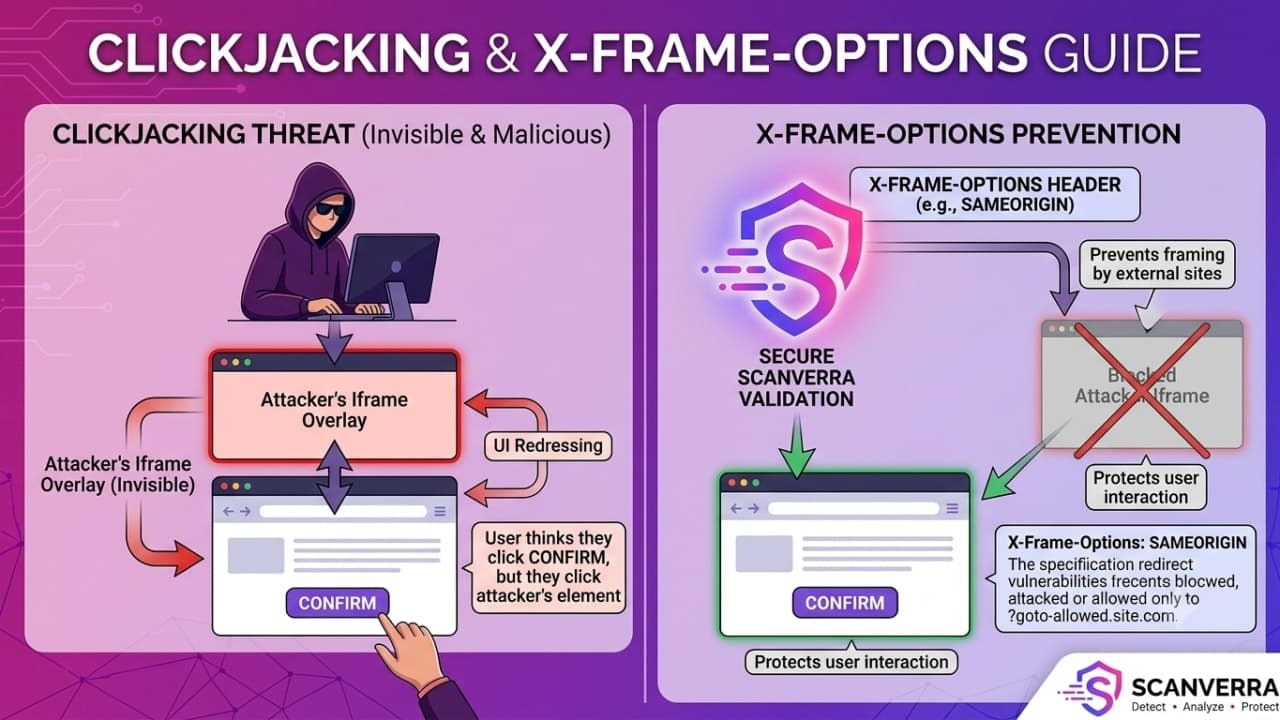
Clickjacking and X-Frame-Options: A Practical Guide
Clickjacking doesn't exploit a bug in your code - it exploits the fact that a browser will happily render your page inside someone else's, invisibly, and let them trick a user into clicking it without knowing.
How the Attack Actually Works
An attacker loads your page inside a transparent <iframe>, positions it exactly over a fake button on their own page, and the victim - seeing only the attacker's decoy - clicks what they think is harmless. The click actually lands on your page underneath: a "delete account" button, a "transfer funds" confirmation, a "follow this account" action - whatever the attacker positioned it over.
The victim is genuinely logged into your site in their own browser the whole time - the attack doesn't need to steal a session or bypass authentication, only to make an authenticated user click something they didn't mean to.
The Header That Stops It
X-Frame-Options tells the browser whether your page is allowed to be rendered inside a frame at all:
X-Frame-Options: DENY- never allow framing, by anyone, including your own site.X-Frame-Options: SAMEORIGIN- allow framing only by pages on your own domain.
The modern equivalent, Content-Security-Policy: frame-ancestors - part of the broader Content Security Policy spec - does the same job with finer control (a specific allowlist of trusted origins instead of just same-origin-or-nobody), and takes precedence in browsers that support both.
What Actually Needs This Header
Any page with a state-changing action behind a single click - account settings, payment confirmations, admin actions, social actions like follow/like/subscribe - is worth protecting. Purely informational pages carry less risk, but there's rarely a good reason to allow arbitrary framing of any page on your site. It's one entry in a broader security headers checklist worth running through in full.
Legitimate Framing Use Cases
If you intentionally embed your own pages in an iframe elsewhere (a widget, an admin panel embedded in an internal tool), use SAMEORIGIN or a specific frame-ancestors allowlist rather than disabling the protection outright - the goal is to permit exactly the framing you intend, not all framing.
Related reading
How to Fix Missing Security Headers
Why missing or weak HTTP security headers leave otherwise-secure code exposed, and how to configure HSTS, CSP, and the rest correctly.
How to Fix Mixed Content Warnings
Why an HTTPS page loading even one resource over plain HTTP triggers browser warnings and breaks the padlock, and how to find and fix every instance.
Find out which headers you're missing
Run a free security scan and get a plain-English breakdown of every header, cert, and exposed secret.
Run a free security scan