
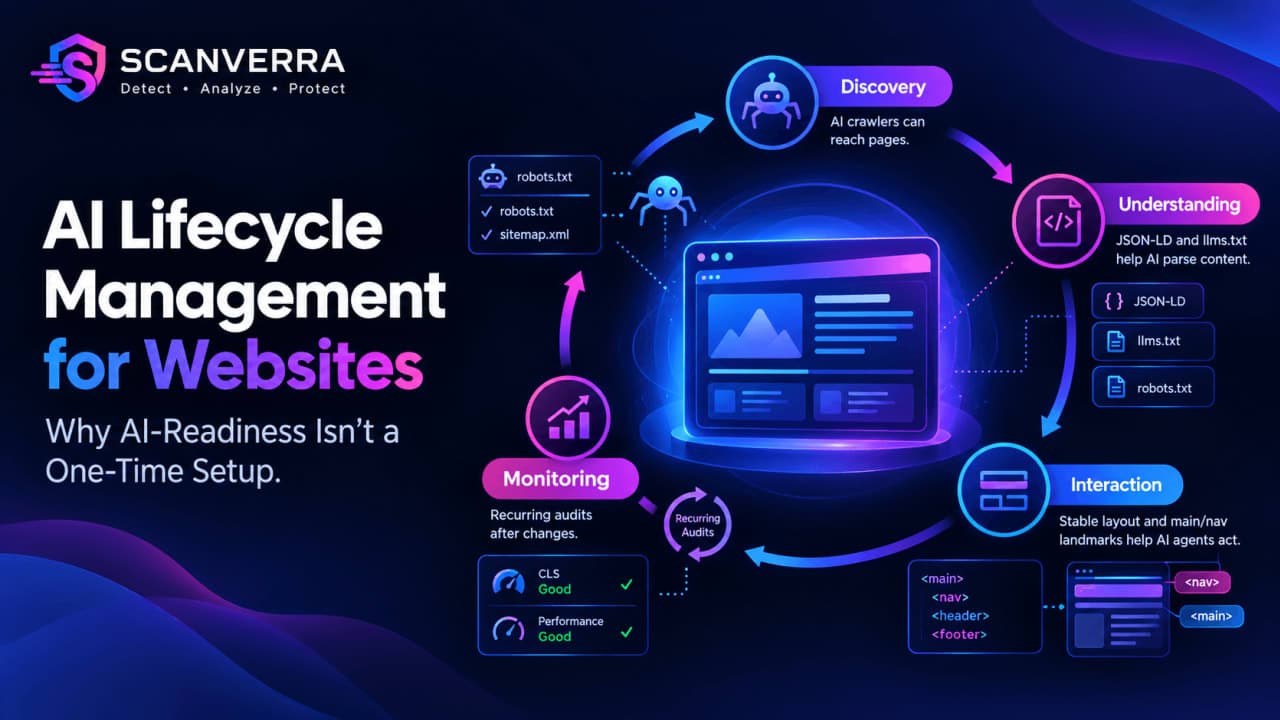
AI Lifecycle Management for Websites: Why AI-Readiness Isn't a One-Time Setup
"AI lifecycle management" usually means something specific: collecting training data, building and validating a model, deploying it, monitoring it in production, and eventually retiring it. That's a real, well-defined discipline, and it mostly lives in data engineering and MLOps teams, not in a website SEO tool.
But there's a second, smaller layer of AI lifecycle management that almost nobody audits on purpose: the lifecycle of how AI systems interact with your website itself. AI crawlers (GPTBot, ClaudeBot, PerplexityBot, CCBot) index your pages. AI search engines cite or ignore your content based on whether they can parse it. AI agents increasingly browse and act on pages the way a human would, clicking, filling forms, and following links. None of that is a one-time setup. New bots launch, standards shift, and a page that was AI-readable six months ago can silently stop being one after a redesign.
This article is about that second layer: what AI lifecycle management for enterprise looks like when it's applied to a website, not a model, and what an AI lifecycle management platform for that layer actually needs to check on an ongoing basis.
| Lifecycle stage | What it means for a website | How to check it |
|---|---|---|
| Discovery | Can AI crawlers and agents reach your pages at all? | robots.txt rules for GPTBot, ClaudeBot, PerplexityBot, CCBot |
| Understanding | Can an AI system parse what a page is actually about? | JSON-LD structured data, an llms.txt summary |
| Interaction | Can an agent act on the page reliably (click, fill, navigate)? | Stable layout (low CLS), <main>/<nav> landmarks |
| Monitoring | Does yesterday's AI-readiness still hold after changes? | Recurring audits, not a one-time checklist |
What AI lifecycle management usually means
In an enterprise ML context, AI lifecycle management covers the full path a model takes: sourcing and labeling data, training, evaluation, deployment, drift monitoring, and retraining or retirement. Storage environments for AI lifecycle management specifically deal with where all of that data and those model artifacts live, how they're versioned, and how they're archived once a model is replaced. That's genuinely a different problem than anything a website audit tool touches, and this article isn't pretending otherwise.
The website layer of AI lifecycle management
Where this connects to Scanverra is narrower and more concrete: your website is increasingly a data source and an interaction surface for AI systems, and that surface has its own lifecycle. It gets built once, then it drifts. A robots.txt file written in 2023 has no rule for a crawler that launched in 2025. A page redesign can remove the <main> landmark an agent used to rely on. A content update can leave old JSON-LD in place that no longer matches the page. None of these break for a human visitor. All of them degrade how AI systems handle the page.
The stages of AI lifecycle management for a website
1. Discovery: can AI crawlers reach the page?
This is the most basic stage, and the easiest to get wrong by accident. A Disallow: / rule meant for one bot can block all of them if it's not scoped to a specific User-agent. Our free Robots.txt Generator includes quick-add rules for GPTBot, ClaudeBot, and PerplexityBot specifically so this stage doesn't depend on memorizing every AI crawler's user-agent string. See our broader guide to robots.txt and sitemap.xml for how this fits into crawling more generally.
2. Understanding: can AI systems parse the page?
Structured data (JSON-LD) and a machine-readable llms.txt summary are how a page tells an AI system what it actually contains, instead of leaving it to infer meaning from raw HTML. We cover this in more depth in Structured Data and AI Search, and our Schema Markup Generator produces the JSON-LD itself.
3. Interaction: can an agent act on the page reliably?
Agentic browsing (an AI agent clicking, filling, and navigating a page the way a person would) depends on layout stability and clear document structure. A high Cumulative Layout Shift score doesn't just hurt Core Web Vitals: it moves the exact element an agent was about to click. A missing <main> landmark forces an agent to guess where the real content starts.
4. Monitoring: does it still hold next quarter?
This is the stage most teams skip entirely, and it's the actual "lifecycle" part of AI lifecycle management. New AI crawlers appear. Site redesigns quietly remove landmarks or structured data. A checklist run once at launch answers a question that keeps changing.
What enterprise teams should actually track
If you're responsible for AI lifecycle management for enterprise at the website level, a practical baseline looks like this:
- Review robots.txt against the current list of major AI crawlers on a recurring schedule, not just at launch
- Keep JSON-LD structured data in sync with page content after redesigns, not just when it was first added
- Track Core Web Vitals (CLS in particular) as an agent-reliability signal, not only a ranking signal
- Confirm
<main>and<nav>landmarks survive template or redesign changes - Re-run an AI-readiness check after any significant site change, the same way you'd re-run a security scan
An AI lifecycle management platform for websites, honestly scoped
Scanverra's Website Audit includes an Agentic Browsing category that checks most of the items above: llms.txt presence, JSON-LD structured data, <main>/<nav> landmarks, AI-crawler access in robots.txt, and CLS as an agent-targeting risk. It's worth being direct about where this stands: this category is still under active development, not a finished, exhaustive AI lifecycle management platform. It's a starting audit, not a replacement for the ML-side tooling that manages actual model training data or storage environments for AI lifecycle management. SEO Optimizer covers the adjacent GEO (generative engine optimization) side: how well your content is positioned to be cited by AI search tools in the first place.
The honest framing: if you came here looking for enterprise AI lifecycle management in the MLOps sense (data pipelines, model versioning, storage environments for AI lifecycle management), that's not what this covers. If you're responsible for keeping a website readable and actionable by AI crawlers and agents over time, that's the narrower, real problem this addresses.
الأسئلة الشائعة
In an enterprise ML context, AI lifecycle management is the full path a model takes: sourcing data, training, deployment, monitoring, and eventual retirement. Applied to a website, it means the ongoing process of keeping your site readable and actionable by AI crawlers and agents as bots, standards, and your own content change over time.
It means treating AI-readiness as a recurring audit, not a one-time setup: reviewing robots.txt against current AI crawlers, keeping structured data in sync with page content, and monitoring layout stability that affects how reliably AI agents can interact with the page.
No. Storage environments for AI lifecycle management, in the MLOps sense, are a separate discipline that Scanverra doesn't touch. Scanverra's Agentic Browsing checks (part of Website Audit, still under development) focus on whether AI crawlers and agents can access and understand your website, not on managing model data or infrastructure.
At minimum: AI-crawler access in robots.txt, structured data (JSON-LD) accuracy, presence of an llms.txt summary, semantic landmarks like <main> and <nav>, and layout stability (CLS) that affects whether an agent can reliably click or fill elements on the page.
Related reading
Robots.txt Generator
Quick-add rules for GPTBot, ClaudeBot, and PerplexityBot
Schema Markup Generator
Generate the JSON-LD this article covers
Structured Data and AI Search
What JSON-LD actually does for AI search
robots.txt and Sitemap.xml Guide
The crawling fundamentals this builds on
Website Audit
Includes the Agentic Browsing check category
SEO Optimizer
GEO readiness and AI-agent scoring
See your full audit score right now
Run a free instant audit and get an AI-prioritized fix list for performance, SEO, and accessibility.
Run a free audit